Your fiber goes down. Your fixed wireless tower loses power. Your Starlink dish gets buried in snow. If you work from home — or just depend on internet for security cameras, smart home, and staying connected — a single point of failure isn’t acceptable.
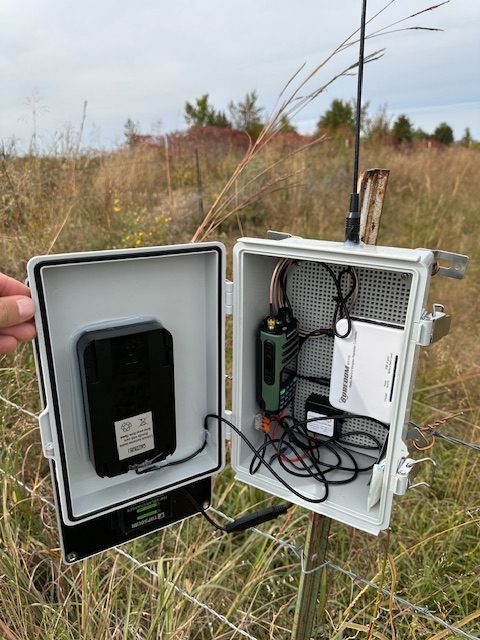
Here’s how to build redundancy into your rural internet setup without breaking the bank.
Why Backup Internet Matters More Now
Remote work changed everything. What used to be an inconvenience (no Netflix for a few hours) is now a crisis — missed meetings, lost productivity, angry clients.
Rural connections fail more often than urban ones. Longer cable and fiber runs mean more failure points. Fixed wireless depends on tower power and line-of-sight. Weather impacts everything out here. And repair crews prioritize population density, which is not us. The solution isn’t hoping for better service — it’s building resilience.
The Backup Options, Ranked
1. Cellular Failover (Best for Most People)
A dedicated LTE or 5G router that activates when your primary connection drops. Your main router detects the outage, switches traffic to cellular, and switches back when primary returns — all automatically.
The Netgear LBR20 (~$300) is a solid consumer option with a built-in LTE modem and support for external antennas. The Peplink MAX BR1 Mini (~$400) is worth the premium for business use — rock-solid reliability and excellent failover logic, used by RVers and emergency services. For newer 5G capability, the GL.iNet Spitz AX (~$350) is great if you like to tinker (it’s OpenWrt-based).
For data plans, T-Mobile Home Internet at $50 a month is truly unlimited with no throttling. Visible+ on the Verizon network runs $45 a month. And the Calyx Institute offers $750 per year for unlimited hotspot on Sprint/T-Mobile. For occasional backup use, a prepaid plan works fine.
2. Starlink (If It’s Not Your Primary)
If you’re on fixed wireless or DSL, Starlink makes an excellent primary. But it can also serve as a great backup for fiber users. The hardware is $499, and service runs $120 a month for Standard or $250 for Priority. Starlink’s sleep mode and pause features let you reduce costs during months when you don’t need it.
3. Phone Hotspot
Free if you already have unlimited data. Not ideal for heavy use, but it works in a pinch. Just enable your hotspot, connect only critical devices, disable automatic updates and cloud sync, and keep an eye on your data. The main downsides are battery drain and hotspot throttling that typically kicks in after 15 to 50 GB.
4. Neighbor’s WiFi
Low-tech but effective. Work out an arrangement with a neighbor who has a different provider. A point-to-point wireless bridge with Ubiquiti gear runs about $100, or just drive over with your laptop in an emergency. The key is that your neighbor’s connection needs to use different infrastructure — two Starlink dishes won’t help during a Starlink outage.
Automatic Failover: The Key to Sanity
Unplugging cables and changing WiFi manually is annoying and slow. Invest in automatic switching.
For a budget setup, many routers support dual WAN connections with automatic failover. The TP-Link ER605 (~$60) is basic but works, the Ubiquiti EdgeRouter X (~$60) is more configurable, and pfSense gives you maximum control. Connect your primary to WAN1, cellular to WAN2, configure failover rules, and you’re done.
For a more polished solution, Peplink Balance, Cradlepoint, or Netgear Orbi with LTE all handle failover elegantly out of the box.
My Setup
I run fiber as primary (50 Mbps, reliable 99 percent of the time) with T-Mobile Home Internet on a Netgear LBR20 as backup. The LBR20 monitors connectivity by pinging external servers — when pings fail for 30 seconds, traffic shifts to LTE, and when fiber returns, it shifts back automatically.
Total hardware cost was about $350 plus $50 a month for cellular. In the past year, I’ve had three fiber outages lasting more than an hour. Each time, failover happened automatically. I didn’t miss a single meeting.
Boosting Weak Cellular Signal
Rural means weak cellular signal, and a backup that barely works isn’t really a backup. An outdoor antenna is the single biggest improvement you can make — the weBoost outdoor antenna (~$70) or Parsec Husky (~$120 for 5G) mounted high can turn 1 bar into 4.
For whole-house amplification, a weBoost Home MultiRoom (~$550) or SureCall Flare (~$350) will boost signal throughout your home. Test your signal strength in different locations before mounting anything permanent — apps like Network Cell Info help you find the sweet spot.
Quick Decision Guide
If you work from home and need reliability, go with a cellular failover router. On a tight budget with only occasional outages? Your phone hotspot plus a prepaid SIM will do. If Starlink is your primary and you want redundancy, look at fixed wireless or cellular as backup. Two neighbors with different ISPs? A point-to-point bridge is cheap and effective. And for mission-critical uptime, run two completely different technologies with automatic failover between them.
Recommended Gear
- Netgear LBR20 — Best consumer LTE failover
- Peplink MAX BR1 Mini — Professional grade
- GL.iNet Spitz AX — 5G capable
- TP-Link ER605 — Budget dual-WAN router
- weBoost Home MultiRoom — Cell signal booster
The Bottom Line
Internet redundancy isn’t paranoia — it’s preparation. The setup cost is less than one day of lost productivity, and the peace of mind is worth even more. Start with a cellular failover router and an unlimited data plan, add an external antenna if your signal is weak, and automate the switching so you never have to think about it.
What’s your backup plan? Share your setup in the comments.
This post contains affiliate links. Purchasing through these links supports Rural Upload at no extra cost to you.